Nodes and styles
.
This page builds a card out of nodes, one call at a time: boxes, text, a word in bold, and a button that changes color under the pointer.
A card
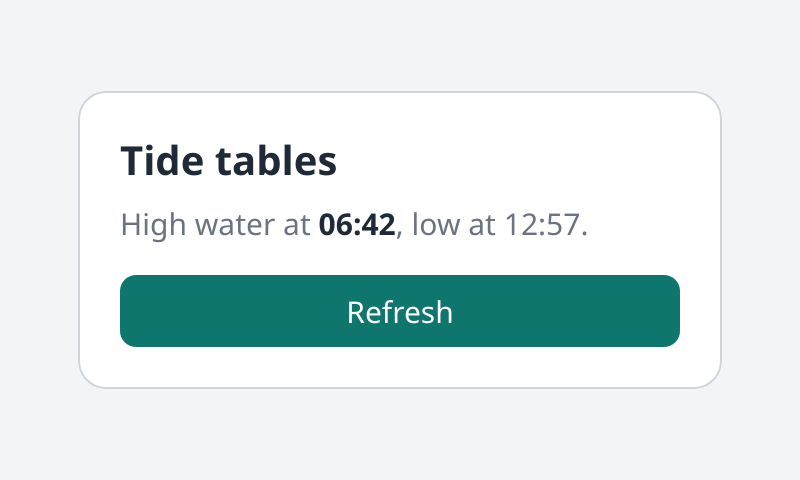
The card from the code below. Where the browser has WebGPU it is running: move the pointer over the button.
examples/src/tree/card.silk
Copy
//! A card built node by node: boxes, text, styles and a hover look.
import
ui_tree.css
import
ui_tree.css { px, percent, Keyword
}
import
ui_tree.lib {
Align
,
BorderStyle
,
BoxNode
,
FlexDirection
,
FontFamily
,
Role
,
StyleState
,
Tree
,
TreeError
}
import
silk.color.rgba { Rgba
}
import
silk.mem.allocator { Allocator
, OutOfMemoryError
}
import
silk.num.u32
/// A color from its hex code.
pub
fn
rgb
(hex: u32) -> Rgba
<f32> {
let
r = u32.toF32
(u32.bitAnd
(u32.shiftRight
(hex, 16
), 255
)) / 255.0
let
g = u32.toF32
(u32.bitAnd
(u32.shiftRight
(hex, 8
), 255
)) / 255.0
let
b = u32.toF32
(u32.bitAnd
(hex, 255
)) / 255.0
return
Rgba
<f32> { r: r, g: g, b: b, a: 1.0
}
}
/// Puts the text `value` at the end of `parent`.
pub
effect
fn
write
(tree: &mut
Tree
<'_>, parent: BoxNode
, value: string) -> ()
! TreeError
| OutOfMemoryError
? &mut
Allocator
{
let
text = run
tree.text
(value)
run
tree.append
(parent, text)
}
/// The handles a client keeps: the nodes it will change or listen to later.
pub
struct
Card
{
pub
root: BoxNode
,
pub
button: BoxNode
,
}
/// Builds the card and makes it the root of `tree`.
pub
effect
fn
build
(tree: &mut
Tree
<'_>, sans: FontFamily
) -> Card
! TreeError
| OutOfMemoryError
? &mut
Allocator
{
// The root is as wide as the viewport, and as tall as its style says. Text properties set here are inherited by everything below.
let
root = run
tree.box
(
&[
css.display
(Keyword
.Flex
),
css.height
(percent
(100.0
)),
css.alignItems
(Align
.Center
),
css.justifyContent
(Align
.Center
),
css.fontFamily
(sans.raw
()),
css.fontSize
(px
(15.0
)),
css.color
(rgb
(0x1F2937
)),
css.backgroundColor
(rgb
(0xF3F4F6
)),
],
)
let
card = run
tree.box
(
&[
css.display
(Keyword
.Flex
),
css.flexDirection
(FlexDirection
.Column
),
css.rowGap
(px
(8.0
)),
css.width
(px
(280.0
)),
css.padding
(px
(20.0
)),
css.borderRadius
(px
(14.0
)),
css.borderWidth
(px
(1.0
)),
css.borderStyle
(BorderStyle
.Solid
),
css.borderColor
(rgb
(0xD1D5DB
)),
css.backgroundColor
(rgb
(0xFFFFFF
)),
],
)
let
title = run
tree.box
(&[css.fontSize
(px
(20.0
)), css.fontWeight
(700.0
)])
run
write
(&mut
tree, title, "Tide tables"
)
// A sentence with one word in another weight: text, a span, text.
let
about = run
tree.box
(&[css.color
(rgb
(0x6B7280
))])
run
write
(&mut
tree, about, "High water at "
)
let
strong = run
tree.span
(&[css.fontWeight
(700.0
), css.color
(rgb
(0x1F2937
))])
run
write
(&mut
tree, strong, "06:42"
)
run
tree.append
(about, strong)
run
write
(&mut
tree, about, ", low at 12:57."
)
let
button = run
tree.box
(
&[
css.display
(Keyword
.Flex
),
css.justifyContent
(Align
.Center
),
css.marginTop
(px
(8.0
)),
css.padding
(px
(8.0
)),
css.borderRadius
(px
(8.0
)),
css.color
(rgb
(0xFFFFFF
)),
css.backgroundColor
(rgb
(0x0F766E
)),
],
)
// The look while the pointer is over the button. The tree switches looks itself.
run
tree.setStyleFor
(button, StyleState
.Hover
, &[css.backgroundColor
(rgb
(0x0D5F58
))])
run
tree.setRole
(button, Role
.Button
)
run
tree.setTestId
(button, "refresh"
)
run
write
(&mut
tree, button, "Refresh"
)
run
tree.append
(card, title)
run
tree.append
(card, about)
run
tree.append
(card, button)
run
tree.append
(root, card)
run
tree.setRoot
(root)
return
Card
{ root: root, button: button }
}The kinds of node
Call
Returns
What it is
tree.box(style)
BoxNode
A box. It can have children
tree.span(style)
BoxNode
An inline box, for part of a sentence
tree.text(value)
TextNode
A piece of text
tree.input(style)
InputNode
An editable text field
tree.image(source, style)
ImageNode
A picture
tree.icon(source, style)
IconNode
A picture drawn in the text color
tree.canvas(style)
CanvasNode
A surface you draw on with commands
A handle is a small value you can copy and keep.
node.id()
is its NodeId
, which is what events and queries name nodes by.Putting nodes together
Call
Does
tree.append(parent, child)
Puts
child
at the end of parent
tree.insertBefore(parent, child, before)
Puts it before another child
tree.remove(node)
Takes it out. It can be appended again
tree.destroy(node)
Frees it and everything in it
tree.setRoot(node)
Makes it the root
A node that is already in the tree moves when it is appended somewhere else, as in the DOM.
After
destroy
, old handles are stale. Using one is an error that says so in a sentence, and its number is never given to another node:Output
Copy
node #12 does not exist (it was destroyed, or never created)
Text
examples/src/tree/card.silk
Copy
/// Puts the text `value` at the end of `parent`.
pub
effect
fn
write
(tree: &mut
Tree
<'_>, parent: BoxNode
, value: string) -> ()
! TreeError
| OutOfMemoryError
? &mut
Allocator
{
let
text = run
tree.text
(value)
run
tree.append
(parent, text)
}Text is a node inside a box. It takes its look from the box: font, size, weight, color.
A sentence with a different word in it is text, a span, and more text, all in one box:
Silk
Copy
let
about = run
tree.box
(&[css.color
(rgb
(0x6B7280
))])
run
write
(&mut
tree, about, "High water at "
)
let
strong = run
tree.span
(&[css.fontWeight
(700.0
), css.color
(rgb
(0x1F2937
))])
run
write
(&mut
tree, strong, "06:42"
)
run
tree.append
(about, strong)
run
write
(&mut
tree, about, ", low at 12:57."
)The three flow as one line and wrap as one paragraph.
Styles
A style is a list of CSS declarations, built with the functions of
ui_tree.css
. The names are the CSS names.Silk
Copy
css.
display
(Keyword
.Flex
),
css.flexDirection
(FlexDirection
.Column
),
css.rowGap
(px
(8.0
)),
css.width
(px
(280.0
)),
css.padding
(px
(20.0
)),Layout follows CSS: block and inline flow, flexbox, grid, absolute and fixed positioning, overflow and scrolling. The text properties inherit from parent to child, and the others do not.
tree.setStyle(node, style)
sets more properties later. Each one replaces its earlier value, and the others stay.Looks for hover, press and focus
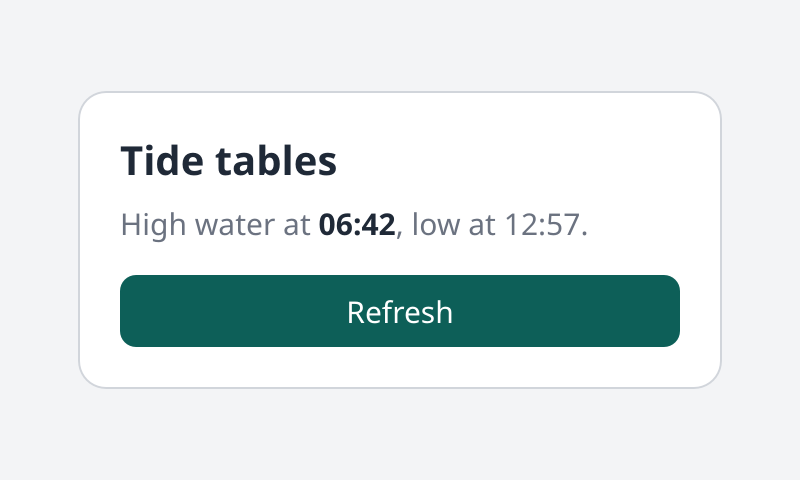
The same tree with the pointer over the button. No code runs for the color change: try it.
Silk
Copy
run
tree.setStyleFor
(button, StyleState
.Hover
, &[css.backgroundColor
(rgb
(0x0D5F58
))])A node has a base look and one more for each state:
Hover
, Active
, Focus
and FocusVisible
. The tree knows where the pointer is and what has focus, and switches looks by itself. A client does not listen for pointer moves to make a button light up.Fonts and pictures
Silk
Copy
let
sans = run
tree.fontFamily
("Inter, Noto Sans, sans-serif"
)
let
logo = run
tree.defineImage
(bytes)fontFamily
takes a list of names, as CSS does, and returns a FontFamily
to use in css.fontFamily(sans.raw())
. The first name the font collection has wins.defineImage
takes the bytes of a PNG or JPEG and defineIcon
those of an SVG. Both return a Resource
for tree.image
and tree.icon
. tree.release(resource)
frees one.A program on Silk UI core names the same things by number instead, and its host loads them. Images and fonts has a whole app with photos, icons and two fonts.
Names for people and tools
Silk
Copy
run
tree.setRole
(button, Role
.Button
)
run
tree.setTestId
(button, "refresh"
)
run
tree.setLabel
(close, "Close"
)The role and the label are what a screen reader says. The test id is how tests and the inspector find a node: see Inspecting a tree.