Text input and focus
.
Editing text is the hardest part of any UI toolkit, and the tree does it for you: the caret, selection with the pointer and the keyboard, word and line movement, copy and paste, undo, scrolling to keep the caret in view, and input methods for languages that compose their text.
The client's part is small. It hears what the value became.
A greeting
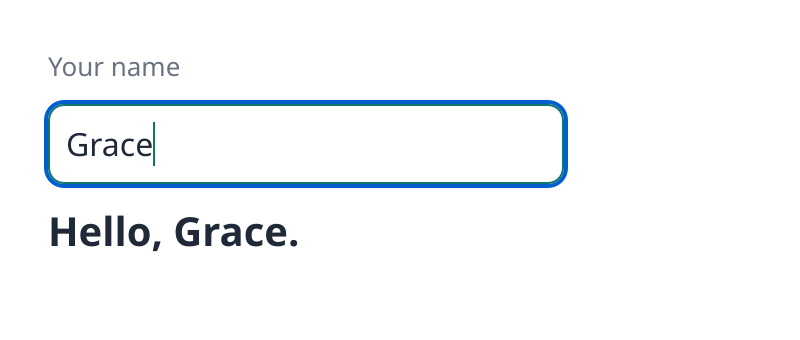
The field. Where the browser has WebGPU it is running, so click it and type. The caret, the focus border, selection and the scrolled text are the tree's work.
examples/src/tree/field.silk
Copy
//! A text field on the bare tree. The tree edits the text itself: it places the caret, moves
//! it with the arrow keys, selects, and scrolls the field to keep the caret in view. The
//! client only hears what the value became.
import
tree.card { rgb, write }
import
ui_tree.css
import
ui_tree.css { px, Keyword
}
import
ui_tree.lib {
Attribute
,
BorderStyle
,
Event
,
EventKind
,
FlexDirection
,
FontFamily
,
InputNode
,
StyleState
,
TextNode
,
Tree
,
TreeError
}
import
silk.mem.allocator { Allocator
, OutOfMemoryError
}
import
silk.text.string { String
}
pub
struct
Greeting
{
pub
name: InputNode
,
pub
hello: TextNode
,
}
pub
effect
fn
build
(tree: &mut
Tree
<'_>, sans: FontFamily
) -> Greeting
! TreeError
| OutOfMemoryError
? &mut
Allocator
{
let
root = run
tree.box
(
&[
css.display
(Keyword
.Flex
),
css.flexDirection
(FlexDirection
.Column
),
css.rowGap
(px
(10.0
)),
css.padding
(px
(24.0
)),
css.fontFamily
(sans.raw
()),
css.fontSize
(px
(16.0
)),
css.color
(rgb
(0x1F2937
)),
css.backgroundColor
(rgb
(0xFFFFFF
)),
],
)
let
caption = run
tree.box
(&[css.color
(rgb
(0x6B7280
)), css.fontSize
(px
(13.0
))])
run
write
(&mut
tree, caption, "Your name"
)
let
name = run
tree.input
(
&[
css.width
(px
(240.0
)),
css.padding
(px
(8.0
)),
css.borderWidth
(px
(1.0
)),
css.borderStyle
(BorderStyle
.Solid
),
css.borderRadius
(px
(8.0
)),
css.borderColor
(rgb
(0xD1D5DB
)),
css.caretColor
(rgb
(0x0F766E
)),
],
)
// The look while the field has focus.
run
tree.setStyleFor
(name, StyleState
.Focus
, &[css.borderColor
(rgb
(0x0F766E
))])
run
tree.setAttribute
(name, Attribute
.Placeholder
{ value: run
String
.copy
("Ada"
) })
run
tree.setLabel
(name, "Your name"
)
run
tree.listen
(name, &[EventKind
.Input
])
let
line = run
tree.box
(&[css.fontSize
(px
(20.0
)), css.fontWeight
(700.0
)])
let
hello = run
tree.text
("Hello."
)
run
tree.append
(line, hello)
run
tree.append
(root, caption)
run
tree.append
(root, name)
run
tree.append
(root, line)
run
tree.setRoot
(root)
return
Greeting
{ name: name, hello: hello }
}
impl
Greeting
{
/// Answers each change of the field by greeting whoever is named in it.
pub
effect
fn
pump
(self: &mut
Self
, tree: &mut
Tree
<'_>) -> ()
! TreeError
| OutOfMemoryError
? &mut
Allocator
{
let
records = run
tree.events
()
let
all = records.asSlice
()
let
mut
i: usize = 0
while
i < all.length {
if
let
Event
.Input
{ change } = &all[i].event {
let
mut
text = run
String
.copy
("Hello"
)
if
change.value.ownedByteLength
() != 0
{
run
text.append
(", "
)
run
text.append
(String
.view
(&change.value))
}
run
text.append
("."
)
run
tree.setText
(self.hello, String
.view
(&text))
}
i = i + 1
}
}
}A field
Silk
Copy
let
name = run
tree.input
(&[css.width
(px
(240.0
)), css.padding
(px
(8.0
)), ...])
run
tree.setAttribute
(name, Attribute
.Placeholder
{ value: run
String
.copy
("Ada"
) })
run
tree.listen
(name, &[EventKind
.Input
])An input is a node like the others: it has a style, looks for focus, and attributes.
Attribute
Effect
Placeholder { value }
The text an empty field shows
Multiline { value: true }
Several lines: Enter breaks the line, text wraps, the box scrolls
ReadOnly { value: true }
The text can be selected and copied, not changed
Disabled { value: true }
No focus and no input
css.caretColor
, css.selectionColor
and css.placeholderColor
style the parts of a field that are not its text.Hearing the value
examples/src/tree/field.silk
Copy
/// Answers each change of the field by greeting whoever is named in it.
pub
effect
fn
pump
(self: &mut
Self
, tree: &mut
Tree
<'_>) -> ()
! TreeError
| OutOfMemoryError
? &mut
Allocator
{
let
records = run
tree.events
()
let
all = records.asSlice
()
let
mut
i: usize = 0
while
i < all.length {
if
let
Event
.Input
{ change } = &all[i].event {
let
mut
text = run
String
.copy
("Hello"
)
if
change.value.ownedByteLength
() != 0
{
run
text.append
(", "
)
run
text.append
(String
.view
(&change.value))
}
run
text.append
("."
)
run
tree.setText
(self.hello, String
.view
(&text))
}
i = i + 1
}
}Each change queues one
Event.Input
record. Its change
has the field's whole new value, what kind of change it was, and where the selection is afterwards.Silk
Copy
Event
.Input
{ change } => {
change.value // the text now
change.inputType // InsertText, DeleteBackward, InsertFromPaste, ...
change.selection // the caret or the selected range
}Setting the value
tree.setText(field, value)
sets a field's text. Setting the value it already has changes nothing, caret included. So a client that keeps the value in its own state can set it back after every change, and stays in control of what the field holds. Silk UI's h.input
works that way.Focus
Call
Does
tree.focus(node)
Gives a node focus
tree.blur()
Takes focus away
tree.focused()
The node that has it, if any
The pointer and the Tab key move focus too. Inputs are in the tab order from the start. Any other node joins with
Attribute.TabIndex { value: 0 }
, and then Enter and Space click it, which is how the counter on the Events page made its box a button.Attribute.FocusTrap { value: true }
keeps Tab inside a node, as a dialog wants.A node has two looks for focus.
StyleState.Focus
applies whenever it has focus. StyleState.FocusVisible
applies only when focus came from the keyboard, which is when a focus ring helps.Selection
Silk
Copy
run
tree.select
(field, Selection
.range
(0
, 5
))
let
selection = tree.selection
(field) // an Option<Selection>
let
caret = run
tree.caretRect
(field) // where the caret is drawn
A selection has an
anchor
and a focus
, so it keeps its direction. selection.start()
and selection.end()
read it in order.Selecting text on the page
Text outside fields is selectable too, with Chrome's rules: drag, double click for a word, triple click for a paragraph, Shift with a click or the arrow keys, and Ctrl+A (Cmd+A on a Mac). Ctrl+C copies the text as a browser does, with line breaks between blocks and tabs between table cells.
Silk
Copy
let
range = run
tree.textSelection
() // an Option<TextRange>, by node id
run
tree.selectText
(TextRange
{ anchor: label, anchorOffset: 0
, focus: label, focusOffset: 5
})
let
copied = run
tree.selectedText
()user-select
decides what can be selected: none
leaves text out, all
selects an element whole, and contain
keeps Ctrl+A inside it. Buttons, links and fields start no selection when pressed.Where flex
order
, a reversed direction, grid placement or positioning shows children out of tree order, a drag selects what it crosses on screen, which browsers do not. tree.setSelectionOrder(SelectionOrder.Tree)
selects in tree order as they do.JavaScript apps read and change the same selection with
getSelection()
.Scrolling
A box with
css.overflowY(Overflow.Auto)
scrolls when its content is taller than it is. The wheel, the keyboard and a drag of the scrollbar all work without code.Call
Does
tree.scrollTo(node, x, y)
Scrolls a box to an offset
tree.scrollIntoView(node)
Scrolls whatever is needed to show a node
tree.scrollOffset(node)
Where a box is scrolled to
A node that listens for
EventKind.Scroll
gets a record when it scrolls.What the frame tells the host
A field needs things from whoever owns the window. The tree does not call the host. It says what it needs in the frame it returns.
Field of the frame
For the host to
cursor
Show the right pointer: an arrow, a text beam, a hand
ime
Tell the system where composed text goes
wakeAt
Ask for another frame then, so the caret blinks
again
Ask for another frame right away
Clipboard reads and writes arrive as
tree.requests()
: the tree asks, and the host answers with the system's clipboard. The window host on the next page does all of this.