Images and fonts
.
A program shows photos, icons and text in fonts of its own. This page builds an album with all three: photos that are PNG and JPEG files, icons that are SVG files, and titles and labels in two fonts that ship with the app.
An album
Live: this is the program below, running

Moonrise
PNG · 160 × 120
2











Click a photo to open it, like it with the heart, search by title, or list only the ones you like.
examples/src/core/album.silk
Copy
//! Album: twelve photos, a search field and likes. Photos are raster images, the heart and the
//! magnifier are SVG icons, and the titles and labels use two fonts of their own.
//!
//! Pictures are named by URL, as on the web: `"photos/dusk.png"` is one of the app's own files.
//! `apps/album` builds those files into the native program, and on a page the browser fetches
//! them beside it. Fonts are still named by number; whoever starts the program says what each
//! number is.
import
loom.font { Font
, Face
, Fonts
}
import
core.look { ACCENT
, INK
, LINE
, MUTED
, fieldLook, rgb }
import
loom.css
import
loom.css { px, Align
, BorderStyle
, FlexWrap
, ObjectFit
, Overflow
, Position
, WhiteSpace
}
import
loom.lib { Attr
, Document
, Node
, NoCommand
, NoOutput
, Program
, Role
, Update
}
import
silk.mem.allocator { Allocator
, OutOfMemoryError
}
import
silk.num.u32
import
silk.num.usize
import
silk.text.string { String
}
// The icons, SVG files of the app's own.
pub
const
HEART
: string<'static
> = "icons/heart.svg"
pub
const
SEARCH
: string<'static
> = "icons/search.svg"
// The fonts of the titles and of the labels. The album carries both (see `fonts`).
pub
const
DISPLAY
: Font
= Font
.of
("Geist, system-ui, sans-serif"
)
pub
const
LABEL
: Font
= Font
.of
("Geist Mono, ui-monospace, monospace"
)
/// Where the album's fonts come from: files beside it, one variable face each. A page that
/// shows the album declares them too.
pub
fn
declareFonts
(fonts: &mut
Fonts
) -> () {
fonts.face
(DISPLAY
, "fonts/Geist.ttf"
, Face
.weights
(100.0
, 900.0
))
fonts.face
(LABEL
, "fonts/GeistMono.ttf"
, Face
.weights
(100.0
, 900.0
))
}
/// One photo: its title, its file, and whether that is a PNG or a JPEG.
pub
struct
Photo
{
pub
index: u32,
pub
title: string<'static
>,
pub
file: string<'static
>,
pub
png: bool,
}
pub
const
COUNT
: u32 = 12
pub
const
PHOTOS
: [Photo
; 12
] = [
Photo
{ index: 0
, title: "Dusk"
, file: "photos/dusk.png"
, png: true
},
Photo
{ index: 1
, title: "Meadow"
, file: "photos/meadow.jpg"
, png: false
},
Photo
{ index: 2
, title: "Moonrise"
, file: "photos/moonrise.png"
, png: true
},
Photo
{ index: 3
, title: "Ember"
, file: "photos/ember.jpg"
, png: false
},
Photo
{ index: 4
, title: "Snowline"
, file: "photos/snowline.png"
, png: true
},
Photo
{ index: 5
, title: "Canyon"
, file: "photos/canyon.jpg"
, png: false
},
Photo
{ index: 6
, title: "Night walk"
, file: "photos/night-walk.png"
, png: true
},
Photo
{ index: 7
, title: "Glacier"
, file: "photos/glacier.jpg"
, png: false
},
Photo
{ index: 8
, title: "Lagoon"
, file: "photos/lagoon.png"
, png: true
},
Photo
{ index: 9
, title: "Red ridge"
, file: "photos/red-ridge.jpg"
, png: false
},
Photo
{ index: 10
, title: "Violet hour"
, file: "photos/violet-hour.png"
, png: true
},
Photo
{ index: 11
, title: "Mist"
, file: "photos/mist.jpg"
, png: false
},
]
pub
struct
Album
{
/// The photo shown large.
pub
open: u32,
pub
liked: [bool; 12
],
pub
query: String
,
/// Whether only liked photos are listed.
pub
likedOnly: bool,
}
pub
union
Message
{
ClickedPhoto
{ pub
index: u32 },
ClickedLike
{ pub
index: u32 },
ChangedQuery
{ pub
value: String
},
ClickedLikedOnly
,
}
type
Next
= Update
<Album
, NoCommand
, NoOutput
>
impl
Program
<Message
, NoCommand
> for
Album
{
effect
fn
init
() -> Next
! OutOfMemoryError
? &mut
Allocator
{
let
mut
liked: [bool; 12
] = [false
; 12
]
liked[2
] = true
liked[8
] = true
return
Next
.of
(Album
{ open: 2
, liked: liked, query: String
.make
(), likedOnly: false
})
}
effect
fn
update
(mut
model: Album
, message: Message
) -> Next
! OutOfMemoryError
? &mut
Allocator
{
match
move
message {
Message
.ClickedPhoto
{ index } => {
model.open = index
}
Message
.ClickedLike
{ index } => {
let
at = u32.toUsize
(index)
model.liked[at] = !model.liked[at]
}
Message
.ChangedQuery
{ value } => {
model.query = move
value
}
Message
.ClickedLikedOnly
=> {
model.likedOnly = !model.likedOnly
}
}
return
Next
.of
(move
model)
}
fn
view
(model: &Album
, h: &Document
<Message
>) -> Node
{
return
h.row
(
&[
h.style
(
&[
css.flexWrap
(FlexWrap
.Wrap
),
css.columnGap
(px
(20.0
)),
css.rowGap
(px
(16.0
)),
css.padding
(px
(16.0
)),
css.color
(rgb
(INK
)),
css.alignItems
(Align
.Start
),
],
),
],
&[viewer
(h, model), browser
(h, model)],
)
}
fn
fonts
(model: &Album
, fonts: &mut
Fonts
) -> () {
declareFonts
(&mut
fonts)
}
}
/// How many photos are liked.
pub
fn
likes
(model: &Album
) -> u32 {
let
mut
count: u32 = 0
let
mut
i: usize = 0
while
i < 12
{
if
model.liked[i] {
count = count + 1
}
i = i + 1
}
return
count
}
/// How many photos are listed.
pub
fn
shown
(model: &Album
) -> u32 {
let
mut
count: u32 = 0
let
mut
i: usize = 0
while
i < 12
{
if
listed
(model, &PHOTOS
[i]) {
count = count + 1
}
i = i + 1
}
return
count
}
/// Whether `photo` is listed: it matches the search, and it is liked when only liked ones are.
pub
fn
listed
(model: &Album
, photo: &Photo
) -> bool {
if
model.likedOnly && !model.liked[u32.toUsize
(photo.index)] {
return
false
}
return
contains
(String
.utf8Bytes
(photo.title), String
.utf8Bytes
(String
.view
(&model.query)))
}
/// Whether `text` has `part` in it, ignoring case (for ASCII letters).
fn
contains
(text: &[u8], part: &[u8]) -> bool {
if
part.length > text.length {
return
false
}
let
mut
at: usize = 0
while
at + part.length <= text.length {
let
mut
i: usize = 0
while
i < part.length && lower
(text[at + i]) == lower
(part[i]) {
i = i + 1
}
if
i == part.length {
return
true
}
at = at + 1
}
return
false
}
fn
lower
(byte: u8) -> u8 {
if
byte >= 65
&& byte <= 90
{
return
byte + 32
}
return
byte
}
/// The open photo, large, with its title, what kind of file it is, and its like button.
fn
viewer
(h: &Document
<Message
>, model: &Album
) -> Node
{
let
photo = &PHOTOS
[u32.toUsize
(model.open)]
return
h.column
(
&[h.style
(&[css.rowGap
(px
(10.0
)), css.width
(px
(288.0
))])],
&[
h.image
(
photo.file,
&[
h.testId
("open"
),
h.label
(photo.title),
h.style
(
&[
css.width
(px
(288.0
)),
css.height
(px
(216.0
)),
css.borderRadius
(px
(14.0
)),
css.objectFit
(ObjectFit
.Cover
),
],
),
],
),
h.row
(
&[h.style
(&[css.alignItems
(Align
.Center
), css.columnGap
(px
(10.0
))])],
&[
h.column
(
&[h.style
(&[css.flexGrow
(1.0
), css.rowGap
(px
(2.0
))])],
&[
h.box
(
&[
h.style
(
&[
css.fontFamily
(DISPLAY
),
css.fontWeight
(650.0
),
css.fontSize
(px
(22.0
)),
css.letterSpacing
("-0.02em"
),
],
),
],
&[h.text
(photo.title)],
),
h.box
(
&[label
(h), h.style
(&[css.color
(rgb
(MUTED
))])],
&[
h.text
(
if
photo.png {
"PNG · 160 × 120"
} else
{
"JPEG · 160 × 120"
},
),
],
),
],
),
like
(h, model, photo.index, 36.0
),
],
),
],
)
}
/// The search field, the liked filter and the photos that are listed.
fn
browser
(h: &Document
<Message
>, model: &Album
) -> Node
{
return
h.column
(
&[h.style
(&[css.rowGap
(px
(12.0
)), css.flexGrow
(1.0
), css.flexBasis
(px
(300.0
))])],
&[
h.row
(
&[h.style
(&[css.columnGap
(px
(8.0
)), css.alignItems
(Align
.Center
)])],
&[
h.row
(
&[h.style
(&[css.position
(Position
.Relative
), css.flexGrow
(1.0
)])],
&[
h.icon
(
SEARCH
,
&[
h.style
(
&[
css.position
(Position
.Absolute
),
css.left
(px
(10.0
)),
css.top
(px
(9.0
)),
css.width
(px
(16.0
)),
css.height
(px
(16.0
)),
css.color
(rgb
(MUTED
)),
],
),
],
),
h.input
(
String
.view
(&model.query),
&[
h.testId
("query"
),
h.label
("Search photos"
),
h.placeholder
("Search"
),
h.onInput
(|value| Message
.ChangedQuery
{ value: move
value }),
fieldLook<Message
>(h),
h.style
(&[css.flexGrow
(1.0
), css.paddingLeft
(px
(32.0
))]),
],
),
],
),
likedOnly
(h, model),
],
),
h.row
(
&[
h.testId
("photos"
),
h.accessRole
(Role
.List
),
h.style
(&[css.flexWrap
(FlexWrap
.Wrap
), css.gap
(px
(8.0
))]),
],
&[
h.each
(
&PHOTOS
,
|photo| if
listed
(model, photo) {
h.keyed
(u32.toU64
(photo.index), thumbnail
(h, model, photo))
} else
{
h.empty
()
},
),
],
),
if
shown
(model) == 0
{
h.box
(
&[h.style
(&[css.color
(rgb
(MUTED
)), css.paddingTop
(px
(24.0
)), css.paddingBottom
(px
(24.0
))])],
&[h.text
("No photos match."
)],
)
} else
{
h.empty
()
},
],
)
}
/// A photo in the list: a button that opens it, with a small heart when it is liked.
fn
thumbnail
(h: &Document
<Message
>, model: &Album
, photo: &Photo
) -> Node
{
let
open = model.open == photo.index
return
h.button
(
&[
h.label
(photo.title),
h.onClick
(Message
.ClickedPhoto
{ index: photo.index }),
h.style
(
&[
css.position
(Position
.Relative
),
css.padding
(px
(0.0
)),
css.borderWidth
(px
(2.0
)),
css.borderStyle
(BorderStyle
.Solid
),
css.borderRadius
(px
(10.0
)),
css.borderColor
(
rgb
(
if
open {
ACCENT
} else
{
0xFFFFFF
},
),
),
css.overflow
(Overflow
.Hidden
),
],
),
],
&[
h.image
(
photo.file,
&[h.style
(&[css.width
(px
(88.0
)), css.height
(px
(66.0
)), css.objectFit
(ObjectFit
.Cover
)])],
),
if
model.liked[u32.toUsize
(photo.index)] {
h.icon
(
HEART
,
&[
h.style
(
&[
css.position
(Position
.Absolute
),
css.right
(px
(5.0
)),
css.bottom
(px
(5.0
)),
css.width
(px
(14.0
)),
css.height
(px
(14.0
)),
css.color
(rgb
(0xFFFFFF
)),
],
),
],
)
} else
{
h.empty
()
},
],
)
}
/// The button that likes photo `index`: a heart outlined in gray, or filled in red.
fn
like
(h: &Document
<Message
>, model: &Album
, index: u32, size: f32) -> Node
{
let
liked = model.liked[u32.toUsize
(index)]
return
h.button
(
&[
h.testId
("like"
),
h.label
(
if
liked {
"Unlike"
} else
{
"Like"
},
),
h.onClick
(Message
.ClickedLike
{ index: index }),
h.style
(
&[
css.width
(px
(size)),
css.height
(px
(size)),
css.padding
(px
(0.0
)),
css.borderWidth
(px
(1.0
)),
css.borderStyle
(BorderStyle
.Solid
),
css.borderRadius
(px
(size)),
css.borderColor
(rgb
(LINE
)),
css.backgroundColor
(rgb
(0xFFFFFF
)),
// The icon is drawn in the text color.
css.color
(
rgb
(
if
liked {
0xE11D48
} else
{
0xD1D5DB
},
),
),
],
),
h.hover
(&[css.backgroundColor
(rgb
(0xFFF1F2
))]),
],
&[
h.row
(
&[
h.style
(
&[
css.width
(px
(size - 2.0
)),
css.height
(px
(size - 2.0
)),
css.alignItems
(Align
.Center
),
css.justifyContent
(Align
.Center
),
],
),
],
&[h.icon
(HEART
, &[h.style
(&[css.width
(px
(18.0
)), css.height
(px
(18.0
))])])],
),
],
)
}
/// The filter that lists only liked photos, with how many there are.
fn
likedOnly
(h: &Document
<Message
>, model: &Album
) -> Node
{
let
on = model.likedOnly
return
h.button
(
&[
h.testId
("liked-only"
),
h.accessRole
(Role
.Checkbox
),
h.checked
(on),
h.onClick
(Message
.ClickedLikedOnly
),
h.style
(
&[
css.paddingTop
(px
(6.0
)),
css.paddingBottom
(px
(6.0
)),
css.paddingLeft
(px
(10.0
)),
css.paddingRight
(px
(12.0
)),
css.borderWidth
(px
(1.0
)),
css.borderStyle
(BorderStyle
.Solid
),
css.borderRadius
(px
(8.0
)),
css.borderColor
(
rgb
(
if
on {
0xE11D48
} else
{
LINE
},
),
),
css.backgroundColor
(
rgb
(
if
on {
0xFFF1F2
} else
{
0xFFFFFF
},
),
),
css.whiteSpace
(WhiteSpace
.NoWrap
),
],
),
],
&[
h.row
(
&[h.style
(&[css.alignItems
(Align
.Center
), css.columnGap
(px
(6.0
))])],
&[
h.icon
(
HEART
,
&[h.style
(&[css.width
(px
(14.0
)), css.height
(px
(14.0
)), css.color
(rgb
(0xE11D48
))])],
),
h.box
(&[label
(h)], &[h.number
(u32.toI64
(likes
(model)))]),
],
),
],
)
}
/// The look of a small label: the label font, a little smaller than the text.
fn
label
(h: &Document
<Message
>) -> Attr
{
return
h.style
(&[css.fontFamily
(LABEL
), css.fontSize
(px
(12.0
)), css.fontVariantNumeric
("tabular-nums"
)])
}Files are URLs
A view never holds a file. It names a picture by URL, as an
<img>
does, and a program names the file of a font by URL, as an @font-face
rule does. The host loads them. A relative URL is one of the app's own files.Silk
Copy
Photo
{ index: 0
, title: "Dusk"
, file: "photos/dusk.png"
, png: true
},
pub
const
HEART
: string<'static
> = "icons/heart.svg"
In the view
What it shows
The file
h.image("photos/dusk.png", attrs)
A raster image
A PNG or JPEG
h.icon("icons/heart.svg", attrs)
A vector icon
An SVG
css.fontFamily(DISPLAY)
Text in a font
TTF or OTF files (WOFF2 on a page)
The URL's scheme says how it loads:
URL
Loaded from
photos/dusk.png
The app's own files: next to the page, or built into a native program
https://example.com/a.png
The network, off the UI thread natively
file:///home/me/a.png
A local file (native only)
data:image/png;base64,...
The URL itself, base64 or percent-encoded (
data:image/svg+xml,%3Csvg...
)Each URL loads once, however many nodes show it. Until it has loaded, the node shows nothing.
h.onLoad(message)
and h.onError(message)
say when it is ready or could not be loaded, as the DOM's load
and error
events do.Raster images
h.image
is the <img>
of Silk UI. It takes the URL and the usual attributes. Give it a label, which is its alt text.examples/src/core/album.silk
Copy
/// The open photo, large, with its title, what kind of file it is, and its like button.
fn
viewer
(h: &Document
<Message
>, model: &Album
) -> Node
{
let
photo = &PHOTOS
[u32.toUsize
(model.open)]
return
h.column
(
&[h.style
(&[css.rowGap
(px
(10.0
)), css.width
(px
(288.0
))])],
&[
h.image
(
photo.file,
&[
h.testId
("open"
),
h.label
(photo.title),
h.style
(
&[
css.width
(px
(288.0
)),
css.height
(px
(216.0
)),
css.borderRadius
(px
(14.0
)),
css.objectFit
(ObjectFit
.Cover
),
],
),
],
),
h.row
(
&[h.style
(&[css.alignItems
(Align
.Center
), css.columnGap
(px
(10.0
))])],
&[
h.column
(
&[h.style
(&[css.flexGrow
(1.0
), css.rowGap
(px
(2.0
))])],
&[
h.box
(
&[
h.style
(
&[
css.fontFamily
(DISPLAY
),
css.fontWeight
(650.0
),
css.fontSize
(px
(22.0
)),
css.letterSpacing
("-0.02em"
),
],
),
],
&[h.text
(photo.title)],
),
h.box
(
&[label
(h), h.style
(&[css.color
(rgb
(MUTED
))])],
&[
h.text
(
if
photo.png {
"PNG · 160 × 120"
} else
{
"JPEG · 160 × 120"
},
),
],
),
],
),
like
(h, model, photo.index, 36.0
),
],
),
],
)
}The style sizes it.
css.objectFit(ObjectFit.Cover)
fills the box and crops what does not fit, as object-fit
does in CSS. ObjectFit.Contain
shows all of it instead. css.borderRadius
rounds its corners.Vector icons
h.icon
draws an SVG the way a page draws an inline <svg>
: its currentColor
is the color of the text, so an icon drawn in currentColor
takes that color, like an icon font. The heart is one file, and the like button makes it red or gray with css.color
.examples/src/core/album.silk
Copy
/// The button that likes photo `index`: a heart outlined in gray, or filled in red.
fn
like
(h: &Document
<Message
>, model: &Album
, index: u32, size: f32) -> Node
{
let
liked = model.liked[u32.toUsize
(index)]
return
h.button
(
&[
h.testId
("like"
),
h.label
(
if
liked {
"Unlike"
} else
{
"Like"
},
),
h.onClick
(Message
.ClickedLike
{ index: index }),
h.style
(
&[
css.width
(px
(size)),
css.height
(px
(size)),
css.padding
(px
(0.0
)),
css.borderWidth
(px
(1.0
)),
css.borderStyle
(BorderStyle
.Solid
),
css.borderRadius
(px
(size)),
css.borderColor
(rgb
(LINE
)),
css.backgroundColor
(rgb
(0xFFFFFF
)),
// The icon is drawn in the text color.
css.color
(
rgb
(
if
liked {
0xE11D48
} else
{
0xD1D5DB
},
),
),
],
),
h.hover
(&[css.backgroundColor
(rgb
(0xFFF1F2
))]),
],
&[
h.row
(
&[
h.style
(
&[
css.width
(px
(size - 2.0
)),
css.height
(px
(size - 2.0
)),
css.alignItems
(Align
.Center
),
css.justifyContent
(Align
.Center
),
],
),
],
&[h.icon
(HEART
, &[h.style
(&[css.width
(px
(18.0
)), css.height
(px
(18.0
))])])],
),
],
)
}Draw an icon's shapes with
fill="currentColor"
or stroke="currentColor"
. In the album, heart.svg
is filled and search.svg
is drawn with strokes, and both work the same way. Shapes in fixed colors, such as a logo's gradient, keep those colors.HTML
Copy
<!-- docs/examples/apps/album/assets/icons/heart.svg -->
<svg xmlns=
"http://www.w3.org/2000/svg"
viewBox="0 0 24 24"
><path d="M12 21 C5 15.5 2 12.5 2 8.5 A5 5 0 0 1 12 6 A5 5 0 0 1 22 8.5 C22 12.5 19 15.5 12 21 Z"
/></svg>An icon scales without blurring, so size it with
css.width
and css.height
and use the same file everywhere. Without a size it takes the width
and height
of its <svg>
, as an inline <svg>
does, and a square of the font size when the file gives none.h.image
takes an SVG file too, as an <img>
does, and draws it the same way. A small icon can live in the view as a data:
URL: h.icon("data:image/svg+xml,<svg ...>...</svg>", attrs)
.Fonts
A
Font
is a CSS font-family
list, made once as a constant. The album uses two: Geist for titles and Geist Mono for small labels and numbers.Silk
Copy
pub
const
DISPLAY
: Font
= Font
.of
("Geist, system-ui, sans-serif"
)
pub
const
LABEL
: Font
= Font
.of
("Geist Mono, ui-monospace, monospace"
)A style names it, and the list works as in CSS: text uses the first family that has its characters.
Silk
Copy
css.
fontFamily
(DISPLAY
),
css.fontWeight
(650.0
),
css.fontSize
(px
(22.0
)),The program says where its fonts come from in
fonts
, the way a page has @font-face
rules. fonts.face(font, url, face)
is one rule: a file for the first family of font
, and the weights and style it covers.examples/src/core/album.silk
Copy
/// Where the album's fonts come from: files beside it, one variable face each. A page that
/// shows the album declares them too.
pub
fn
declareFonts
(fonts: &mut
Fonts
) -> () {
fonts.face
(DISPLAY
, "fonts/Geist.ttf"
, Face
.weights
(100.0
, 900.0
))
fonts.face
(LABEL
, "fonts/GeistMono.ttf"
, Face
.weights
(100.0
, 900.0
))
}Silk
Copy
fn
fonts
(model: &Album
, fonts: &mut
Fonts
) -> () {
declareFonts
(&mut
fonts)
}In
fonts
What it is on the web
fonts.face(DISPLAY, "fonts/Geist.ttf", Face.weights(100.0, 900.0))
An
@font-face
rulefonts.stylesheet("https://fonts.googleapis.com/css2?family=Inter")
A
<link rel="stylesheet">
of @font-face
rulesfonts.family(MONO)
A family of installed fonts, with no rule
Every
Font
a view uses goes in fonts
, with face
or family
. A family with no face declared uses the fonts installed where the program runs. The generic names (system-ui
, sans-serif
, serif
, monospace
) are always there.A face loads when text first needs it. Until then the text draws with the next family in the list, then lays out again, as
font-display: swap
does.css.fontWeight
takes any weight from 1 to 1000, as CSS does. Geist is a variable font, so one file has every weight from 100 to 900, and 650 is drawn as 650. With separate files (a regular and a bold, say), declare a face for each with Face.weight(700.0)
, and the closest weight is used.The files: in a page
On a page the browser loads the pictures and the fonts, relative URLs from the app's root. Each face becomes a
FontFace
in document.fonts
, so the page needs nothing for them.examples/apps/album-web/web/index.html
Copy
<!doctype html>
<html lang=
"en"
>
<head>
<meta charset="utf-8"
/>
<meta name="viewport"
content="width=device-width, initial-scale=1"
/>
<title>Album</title>
<style>
body {
margin: 0
;
font-family: system-ui, sans-serif;
}
</style>
</head>
<body>
<div id="app"
></div>
<script type="module"
>
import
{ mount } from
"./silk-ui-dom.js"
;
// The album names its photos, icons and fonts by URL ("photos/dusk.png",
// "fonts/Geist.ttf"), so the page loads them from beside itself.
await
mount
({
wasm: "./album.wasm"
,
root: document.getElementById
("app"
),
});
</script>
</body>
</html>The build copies the files next to the page, where the URLs point:
Shell
Copy
cp -R docs/examples/apps/album/assets/. dist/
Run
sh docs/examples/apps/album-web/build.sh serve
and open http://localhost:8019.The files: in a native window
In a window, the app's own files are part of the program.
Source.read
reads a file of the package while it compiles, and window.file
serves it for a relative URL, so the app is one file with nothing to ship beside it. The files sit in assets/
, next to the app's silk.toml
.examples/apps/album/src/files.silk
Copy
//! The files the album names by URL, from `assets/` beside `silk.toml`. They are part of the
//! program: `Source.read` makes each file's bytes a constant when the package compiles, so
//! there is nothing to ship beside it.
import
loom_window.program { Window
}
import
silk.build.source { Source
}
import
silk.mem.allocator { Allocator
, OutOfMemoryError
}
/// Serves the photos, icons and fonts for the relative URLs the album names
/// (`"photos/dusk.png"`, `"fonts/Geist.ttf"`).
pub
effect
fn
carry
(window: &mut
Window
) -> ()
! OutOfMemoryError
? &mut
Allocator
{
run
window.file
("photos/dusk.png"
, Source
.read
("assets/photos/dusk.png"
))
run
window.file
("photos/meadow.jpg"
, Source
.read
("assets/photos/meadow.jpg"
))
run
window.file
("photos/moonrise.png"
, Source
.read
("assets/photos/moonrise.png"
))
run
window.file
("photos/ember.jpg"
, Source
.read
("assets/photos/ember.jpg"
))
run
window.file
("photos/snowline.png"
, Source
.read
("assets/photos/snowline.png"
))
run
window.file
("photos/canyon.jpg"
, Source
.read
("assets/photos/canyon.jpg"
))
run
window.file
("photos/night-walk.png"
, Source
.read
("assets/photos/night-walk.png"
))
run
window.file
("photos/glacier.jpg"
, Source
.read
("assets/photos/glacier.jpg"
))
run
window.file
("photos/lagoon.png"
, Source
.read
("assets/photos/lagoon.png"
))
run
window.file
("photos/red-ridge.jpg"
, Source
.read
("assets/photos/red-ridge.jpg"
))
run
window.file
("photos/violet-hour.png"
, Source
.read
("assets/photos/violet-hour.png"
))
run
window.file
("photos/mist.jpg"
, Source
.read
("assets/photos/mist.jpg"
))
// Icons are SVG files. They are drawn in the color of the text around them.
run
window.file
("icons/heart.svg"
, Source
.read
("assets/icons/heart.svg"
))
run
window.file
("icons/search.svg"
, Source
.read
("assets/icons/search.svg"
))
// Geist is a variable font: one file has every weight from 100 to 900.
run
window.file
("fonts/Geist.ttf"
, Source
.read
("assets/fonts/Geist.ttf"
))
run
window.file
("fonts/GeistMono.ttf"
, Source
.read
("assets/fonts/GeistMono.ttf"
))
}A relative URL the program does not carry is read from the working directory instead. The window gets the files, and
systemFonts()
is the fonts installed on the machine, for the families no face is declared for:examples/apps/album/src/main.silk
Copy
//! The album in a native window. The program names its pictures and fonts by URL;
//! `files.silk` builds those files into the program.
import
examples.core.album { Album
, Message
}
import
files
import
loom.lib { NoCommand
}
import
loom_window.program { Launched
, Window
, failed, launch, show, systemFonts }
import
silk.core.effect
{ Effect
}
import
silk.core.option { Option
}
import
silk.mem.allocator { Allocator
, OutOfMemoryError
}
effect
fn
album
(platform: Option
<Launched
>) -> i32
! OutOfMemoryError
? &mut
Allocator
{
let
mut
window = run
Window
.make
("Album"
, 640.0
, 420.0
)
// The photos, icons and fonts, for the URLs the album names.
run
files.carry
(&mut
window)
let
fonts = run
systemFonts
()
return
run
show<Album
, Message
, NoCommand
, never
>(move
window, &fonts, move
platform)
}
fn
app
(platform: Option
<Launched
>) -> i32 {
let
mut
allocator = Allocator
.systemAllocatorProvider
()
return
run
Effect
.catchAll
(album
(move
platform), failed)
|> Effect
.provideMut<Allocator
>(&mut
allocator)
}
pub
fn
main
() -> i32 {
return
launch
(
|platform: Option
<Launched
>| -> i32 {
return
app
(move
platform)
},
)
}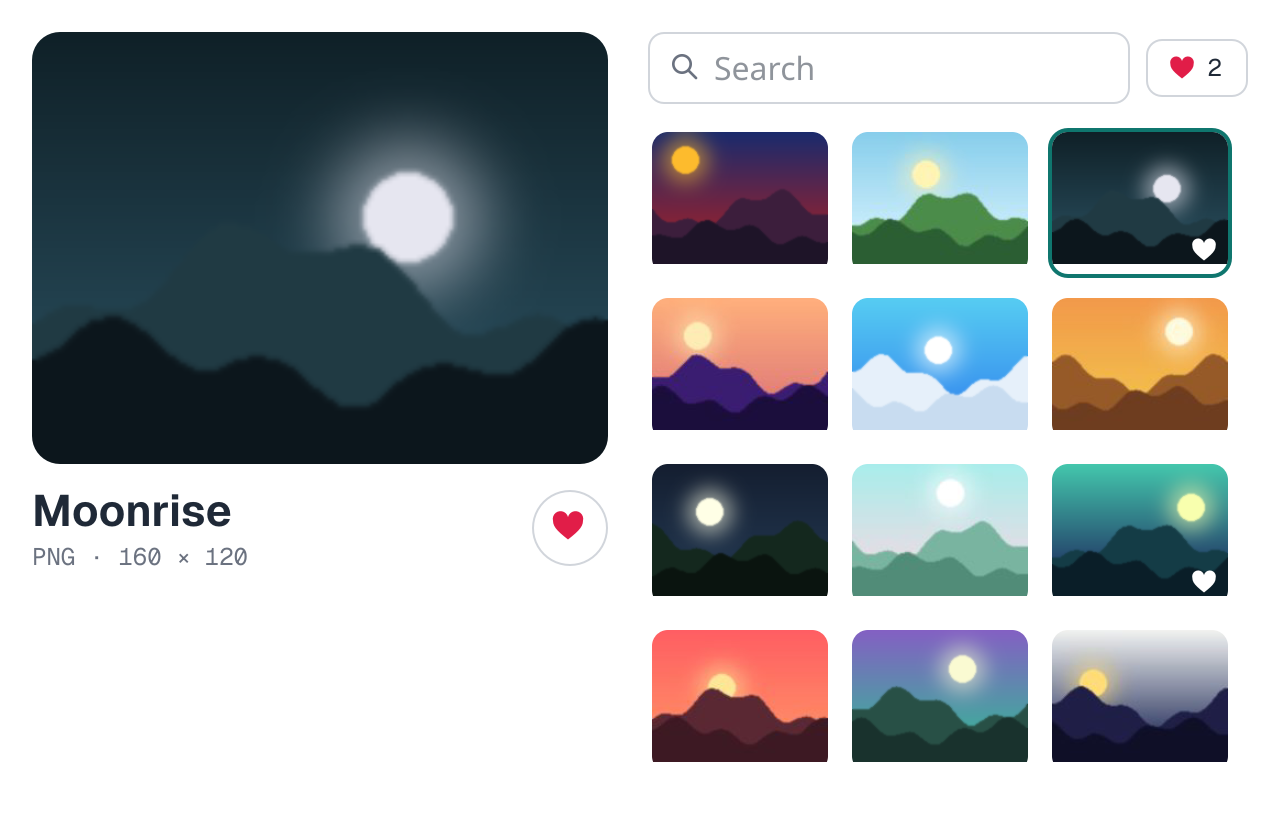
The same album in a window. In the docs the GPU draws it, from the same photos, icons and fonts.
Run it with
silk run --manifest-path docs/examples/apps/album/silk.toml
.Recap
•
A view names images and icons by URL:
h.image("photos/dusk.png", attrs)
, h.icon("icons/heart.svg", attrs)
. The scheme picks the loader; relative URLs are the app's own files.•
A page loads them like any
<img>
or @font-face
. A native window serves the files the program carries with window.file
, and loads https:
, file:
and data:
URLs itself.•
h.onLoad
and h.onError
say when a picture is ready or failed.•
Icons are SVGs whose
currentColor
is the text color. Images are PNGs or JPEGs, sized with CSS and fitted with object-fit
.•
A
Font
constant is a font-family
list. fonts
declares where each face comes from (fonts.face
, fonts.stylesheet
) and the families of installed fonts (fonts.family
).•
css.fontWeight
takes any weight a font has. A variable font has all of them in one file.The tree has the same three: see Fonts and pictures.
Next: Events and input.