The shell
.
A desktop app does more than draw in a rectangle. It has a title, a menu bar, open and save dialogs, a clipboard, and a close button that sometimes must ask first. Around the window it may have a tray icon, shortcuts that work in any app, notifications, and files dropped on it. Silk UI calls all of that the
shell
.This page reads one app that uses every part of it.
Pad
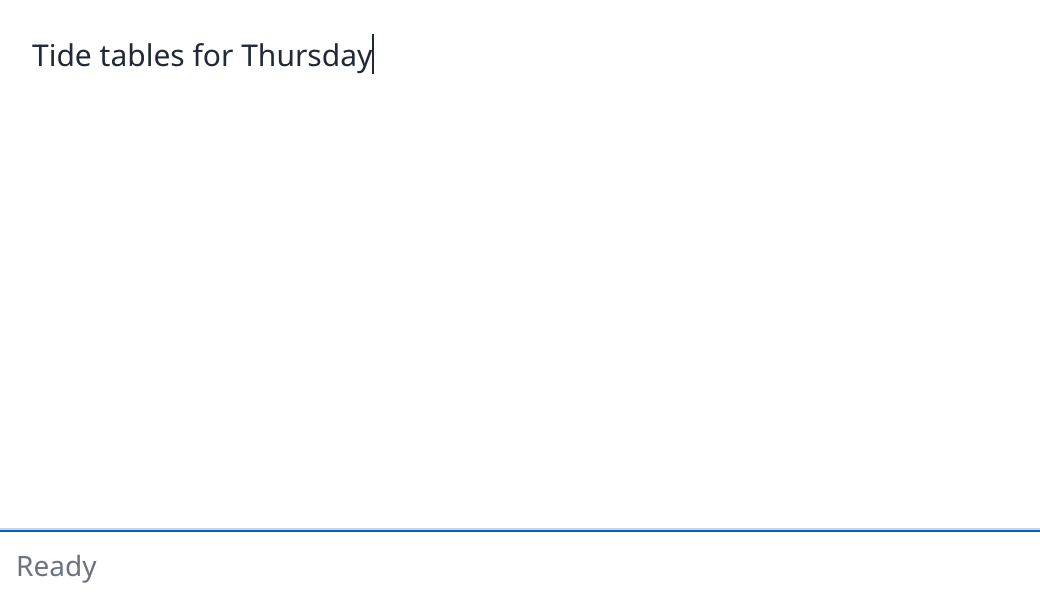
Pad. Where the browser has WebGPU it runs here, and you can type in it. The page draws the title bar a desktop would. A page has no menu bar and no files, so those parts need the desktop.
Pad edits one note. It has a menu bar, opens and saves files through the system's dialogs, copies to the clipboard, follows the system's dark appearance, and asks before it closes with unsaved work.
examples/src/native/pad.silk
Copy
//! Pad: one note in a native window. A menu bar, open and save dialogs, the clipboard, the
//! system's dark appearance, and a close that asks before it loses work.
//!
//! Everything it asks of the window goes through the `Shell` service and the files through
//! `Disk`, so the tests run it with no window at all.
import
core.look { button, primary, rgb }
import
loom.css
import
loom.css { px, percent, Align
, BorderStyle
, Overflow
}
import
loom.keys { MOD_SHIFT
}
import
loom.lib {
CommandSet
,
Document
,
FileDialog
,
Menu
,
Node
,
NoOutput
,
Program
,
Shell
,
StandardItem
,
Subscriptions
,
Update
,
commandKey
}
import
silk.collections.list { List
}
import
silk.color.rgba { Rgba
}
import
silk.mem.allocator { Allocator
, OutOfMemoryError
}
import
silk.text.string { String
}
// The menu's actions.
pub
const
NEW
: u32 = 1
pub
const
OPEN
: u32 = 2
pub
const
SAVE
: u32 = 3
pub
const
COPY
: u32 = 4
// The dialogs.
pub
const
OPENING
: u32 = 1
pub
const
SAVING
: u32 = 2
pub
struct
Pad
{
pub
text: String
,
/// Whether there is work that was not saved.
pub
dirty: bool,
pub
dark: bool,
/// The user asked to close a note with unsaved work.
pub
asking: bool,
pub
status: String
,
}
pub
union
Message
{
ChangedText
{ pub
value: String
},
ChoseMenuItem
{ pub
action: u32 },
ClosedDialog
{ pub
request: u32, pub
paths: List
<String
> },
LoadedFile
{ pub
text: String
},
SavedFile
,
FailedToSave
,
ChangedAppearance
{ pub
dark: bool },
RequestedClose
,
ClickedDiscard
,
ClickedKeepEditing
,
CompletedShellRequest
,
}
/// Where notes are kept. The app provides the machine's files, and a test a file in memory.
pub
service
Disk
{
/// The text of the file at `path`; empty when it cannot be read.
effect
fn
read
(path: string) -> String
! OutOfMemoryError
? &mut
Disk
| &mut
Allocator
/// Whether `text` was written to `path`.
effect
fn
write
(path: string, text: string) -> bool
! OutOfMemoryError
? &mut
Disk
| &mut
Allocator
}
pub
union
Command
{
/// Installs the menu and asks for the appearance.
SetUp
,
SetTitle
{ pub
dirty: bool },
AskOpen
,
AskSave
,
Read
{ pub
path: String
},
Write
{ pub
path: String
, pub
text: String
},
Copy
{ pub
text: String
},
Quit
,
}
/// The menu bar. On macOS the first menu is the app's own.
effect
fn
menu
() -> Menu
! OutOfMemoryError
? &mut
Allocator
{
let
mut
menu = Menu
.make
()
run
menu.begin
("Pad"
)
run
menu.standard
(StandardItem
.About
)
run
menu.separator
()
run
menu.standard
(StandardItem
.Quit
)
run
menu.end
()
run
menu.begin
("File"
)
run
menu.action
("New"
, NEW
, "n"
, commandKey
())
run
menu.action
("Open…"
, OPEN
, "o"
, commandKey
())
run
menu.action
("Save As…"
, SAVE
, "s"
, commandKey
() | MOD_SHIFT
)
run
menu.separator
()
run
menu.standard
(StandardItem
.CloseWindow
)
run
menu.end
()
run
menu.begin
("Edit"
)
run
menu.action
("Copy Note"
, COPY
, "c"
, commandKey
() | MOD_SHIFT
)
run
menu.end
()
return
move
menu
}
impl
CommandSet
<Message
? &mut
Shell
| &mut
Disk
| &mut
Allocator
> for
Command
{
effect
fn
execute
(self: Self
) -> Message
! OutOfMemoryError
? &mut
Shell
| &mut
Disk
| &mut
Allocator
{
match
move
self {
Command
.SetUp
=> {
run
Shell
.setMenu
(run
menu
())
return
Message
.ChangedAppearance
{ dark: run
Shell
.dark
() }
}
Command
.SetTitle
{ dirty } => {
run
Shell
.setTitle
(
if
dirty {
"Pad (edited)"
} else
{
"Pad"
},
)
}
Command
.AskOpen
=> {
// The dialog opens and the command ends. The answer comes through `subs.files`.
run
Shell
.openFile
(OPENING
, FileDialog
.file
("Open a note"
, "txt,md"
))
}
Command
.AskSave
=> {
run
Shell
.saveFile
(SAVING
, FileDialog
.saving
("Save the note"
, "note.txt"
, "txt,md"
))
}
Command
.Read
{ path } => {
return
Message
.LoadedFile
{ text: run
Disk
.read
(String
.view
(&path)) }
}
Command
.Write
{ path, text } => {
if
run
Disk
.write
(String
.view
(&path), String
.view
(&text)) {
return
Message
.SavedFile
}
return
Message
.FailedToSave
}
Command
.Copy
{ text } => {
run
Shell
.copy
(String
.view
(&text))
}
Command
.Quit
=> {
run
Shell
.quit
()
}
}
return
Message
.CompletedShellRequest
}
}
type
Next
= Update
<Pad
, Command
, NoOutput
>
effect
fn
say
(model: &mut
Pad
, text: string) -> ()
! OutOfMemoryError
? &mut
Allocator
{
model.status = run
String
.copy
(text)
}
impl
Program
<Message
, Command
> for
Pad
{
effect
fn
init
() -> Next
! OutOfMemoryError
? &mut
Allocator
{
let
model = Pad
{
text: String
.make
(),
dirty: false
,
dark: false
,
asking: false
,
status: run
String
.copy
("Ready"
),
}
return
run
Next
.with
(move
model, Command
.SetUp
)
}
effect
fn
update
(mut
model: Pad
, message: Message
) -> Next
! OutOfMemoryError
? &mut
Allocator
{
match
move
message {
Message
.ChangedText
{ value } => {
let
was = model.dirty
model.text = move
value
model.dirty = true
if
!was {
return
run
Next
.with
(move
model, Command
.SetTitle
{ dirty: true
})
}
}
Message
.ChoseMenuItem
{ action } => {
if
action == NEW
{
model.text = String
.make
()
model.dirty = false
run
say
(&mut
model, "New note"
)
return
run
Next
.with
(move
model, Command
.SetTitle
{ dirty: false
})
}
if
action == OPEN
{
return
run
Next
.with
(move
model, Command
.AskOpen
)
}
if
action == SAVE
{
return
run
Next
.with
(move
model, Command
.AskSave
)
}
if
action == COPY
{
let
text = run
String
.copy
(String
.view
(&model.text))
run
say
(&mut
model, "Copied"
)
return
run
Next
.with
(move
model, Command
.Copy
{ text: move
text })
}
}
Message
.ClosedDialog
{ request, paths } => {
let
mut
chosen = move
paths
if
chosen.length
() == 0
{
run
say
(&mut
model, "Cancelled"
)
return
Next
.of
(move
model)
}
let
path = chosen.remove
(0
)
if
request == OPENING
{
return
run
Next
.with
(move
model, Command
.Read
{ path: move
path })
}
let
text = run
String
.copy
(String
.view
(&model.text))
return
run
Next
.with
(move
model, Command
.Write
{ path: move
path, text: move
text })
}
Message
.LoadedFile
{ text } => {
model.text = move
text
model.dirty = false
run
say
(&mut
model, "Opened"
)
return
run
Next
.with
(move
model, Command
.SetTitle
{ dirty: false
})
}
Message
.SavedFile
=> {
model.dirty = false
run
say
(&mut
model, "Saved"
)
return
run
Next
.with
(move
model, Command
.SetTitle
{ dirty: false
})
}
Message
.FailedToSave
=> {
run
say
(&mut
model, "Could not save the note"
)
}
Message
.ChangedAppearance
{ dark } => {
model.dark = dark
}
Message
.RequestedClose
=> {
if
!model.dirty {
return
run
Next
.with
(move
model, Command
.Quit
)
}
model.asking = true
}
Message
.ClickedDiscard
=> {
return
run
Next
.with
(move
model, Command
.Quit
)
}
Message
.ClickedKeepEditing
=> {
model.asking = false
}
Message
.CompletedShellRequest
=> {}
}
return
Next
.of
(move
model)
}
fn
view
(model: &Pad
, h: &Document
<Message
>) -> Node
{
let
page = shade
(model.dark, 0xFFFFFF
, 0x16181D
)
let
ink = shade
(model.dark, 0x1F2937
, 0xE5E7EB
)
let
faint = shade
(model.dark, 0x6B7280
, 0x9CA3AF
)
let
line = shade
(model.dark, 0xD1D5DB
, 0x343944
)
return
h.column
(
&[
h.style
(
&[
css.height
(percent
(100.0
)),
css.fontSize
(px
(14.0
)),
css.color
(ink),
css.backgroundColor
(page),
],
),
],
&[
if
model.asking {
h.row
(
&[
h.testId
("unsaved"
),
h.style
(
&[
css.alignItems
(Align
.Center
),
css.columnGap
(px
(8.0
)),
css.padding
(px
(8.0
)),
css.color
(rgb
(0x1F2937
)),
css.backgroundColor
(rgb
(0xFEF3C7
)),
],
),
],
&[
h.box
(&[h.style
(&[css.flexGrow
(1.0
)])], &[h.text
("This note has unsaved work."
)]),
button
(h, "Keep editing"
, Message
.ClickedKeepEditing
),
primary
(h, "Discard and close"
, Message
.ClickedDiscard
),
],
)
} else
{
h.empty
()
},
h.input
(
String
.view
(&model.text),
&[
h.testId
("note"
),
h.label
("Note"
),
h.multiline
(true
),
h.placeholder
("Write something…"
),
h.onInput
(|value| Message
.ChangedText
{ value: move
value }),
h.style
(
&[
css.flexGrow
(1.0
),
css.minHeight
(px
(0.0
)),
css.padding
(px
(16.0
)),
css.fontSize
(px
(15.0
)),
css.lineHeight
(px
(22.0
)),
css.color
(ink),
css.overflowY
(Overflow
.Auto
),
],
),
],
),
h.box
(
&[
h.testId
("status"
),
h.style
(
&[
css.padding
(px
(8.0
)),
css.color
(faint),
css.borderTopWidth
(px
(1.0
)),
css.borderStyle
(BorderStyle
.Solid
),
css.borderColor
(line),
],
),
],
&[h.text
(String
.view
(&model.status))],
),
],
)
}
/// What the window has to say comes back as subscriptions.
fn
subscriptions
(model: &Pad
, subs: &mut
Subscriptions
<Message
>) -> () {
subs.menuAction
(1
, |action| Message
.ChoseMenuItem
{ action: action })
subs.files
(2
, |request, paths| Message
.ClosedDialog
{ request: request, paths: move
paths })
subs.appearance
(3
, |dark| Message
.ChangedAppearance
{ dark: dark })
subs.closeRequested
(4
, || Message
.RequestedClose
)
}
}
fn
shade
(dark: bool, light: u32, night: u32) -> Rgba
<f32> {
return
if
dark {
rgb
(night)
} else
{
rgb
(light)
}
}Asking the shell: commands
The shell is a service, like any other thing a program needs from outside. A command asks it for something:
examples/src/native/pad.silk
Copy
impl
CommandSet
<Message
? &mut
Shell
| &mut
Disk
| &mut
Allocator
> for
Command
{
effect
fn
execute
(self: Self
) -> Message
! OutOfMemoryError
? &mut
Shell
| &mut
Disk
| &mut
Allocator
{
match
move
self {
Command
.SetUp
=> {
run
Shell
.setMenu
(run
menu
())
return
Message
.ChangedAppearance
{ dark: run
Shell
.dark
() }
}
Command
.SetTitle
{ dirty } => {
run
Shell
.setTitle
(
if
dirty {
"Pad (edited)"
} else
{
"Pad"
},
)
}
Command
.AskOpen
=> {
// The dialog opens and the command ends. The answer comes through `subs.files`.
run
Shell
.openFile
(OPENING
, FileDialog
.file
("Open a note"
, "txt,md"
))
}
Command
.AskSave
=> {
run
Shell
.saveFile
(SAVING
, FileDialog
.saving
("Save the note"
, "note.txt"
, "txt,md"
))
}
Command
.Read
{ path } => {
return
Message
.LoadedFile
{ text: run
Disk
.read
(String
.view
(&path)) }
}
Command
.Write
{ path, text } => {
if
run
Disk
.write
(String
.view
(&path), String
.view
(&text)) {
return
Message
.SavedFile
}
return
Message
.FailedToSave
}
Command
.Copy
{ text } => {
run
Shell
.copy
(String
.view
(&text))
}
Command
.Quit
=> {
run
Shell
.quit
()
}
}
return
Message
.CompletedShellRequest
}
}Call
Does
Shell.setTitle(text)
Sets the window's title
Shell.setSize(width, height)
Sets the size of the window's content
Shell.minimize()
, Shell.toggleFullScreen()
What they say
Shell.setMenu(menu)
Installs the menu bar
Shell.openFile(request, dialog)
Opens a dialog that chooses files to open
Shell.saveFile(request, dialog)
Opens a dialog that chooses where to save
Shell.copy(text)
, Shell.paste()
Writes and reads the clipboard
Shell.dark()
Whether the system asks for a dark appearance
Shell.quit()
Closes the window and ends the program
Shell.setTray(tray)
, Shell.removeTray()
Shows an icon in the system tray, or takes it away
Shell.registerShortcut(id, code, modifiers)
, Shell.unregisterShortcut(id)
A shortcut that works whichever app has focus
Shell.notify(id, title, body)
Shows a desktop notification
Hearing from the shell: subscriptions
What the window has to say comes back the way everything comes back: as messages, through subscriptions.
examples/src/native/pad.silk
Copy
/// What the window has to say comes back as subscriptions.
fn
subscriptions
(model: &Pad
, subs: &mut
Subscriptions
<Message
>) -> () {
subs.menuAction
(1
, |action| Message
.ChoseMenuItem
{ action: action })
subs.files
(2
, |request, paths| Message
.ClosedDialog
{ request: request, paths: move
paths })
subs.appearance
(3
, |dark| Message
.ChangedAppearance
{ dark: dark })
subs.closeRequested
(4
, || Message
.RequestedClose
)
}Subscription
Sends a message when
subs.menuAction
An item of the menu is chosen
subs.files
A file dialog closes
subs.appearance
The system switches between light and dark
subs.windowFocus
The window becomes the one the user works in, or stops being it
subs.closeRequested
The user asks to close the window or quit
subs.fileDrag
Files dragged in from another app enter, move over, leave or drop on the window
subs.globalShortcut
A shortcut
Shell.registerShortcut
gave is pressedsubs.trayClick
The tray icon, set with no menu, is clicked
subs.notificationClick
The user clicks a notification
The menu bar
examples/src/native/pad.silk
Copy
/// The menu bar. On macOS the first menu is the app's own.
effect
fn
menu
() -> Menu
! OutOfMemoryError
? &mut
Allocator
{
let
mut
menu = Menu
.make
()
run
menu.begin
("Pad"
)
run
menu.standard
(StandardItem
.About
)
run
menu.separator
()
run
menu.standard
(StandardItem
.Quit
)
run
menu.end
()
run
menu.begin
("File"
)
run
menu.action
("New"
, NEW
, "n"
, commandKey
())
run
menu.action
("Open…"
, OPEN
, "o"
, commandKey
())
run
menu.action
("Save As…"
, SAVE
, "s"
, commandKey
() | MOD_SHIFT
)
run
menu.separator
()
run
menu.standard
(StandardItem
.CloseWindow
)
run
menu.end
()
run
menu.begin
("Edit"
)
run
menu.action
("Copy Note"
, COPY
, "c"
, commandKey
() | MOD_SHIFT
)
run
menu.end
()
return
move
menu
}A menu is built in order:
begin
opens a menu, end
closes it, and a begin
inside another makes a submenu.•
menu.action(title, action, key, modifiers)
is an item of your own. action
is a number you choose, and subs.menuAction
hands it back when the item is chosen.•
commandKey()
is Command on macOS and Control elsewhere, so "s"
with commandKey()
is the shortcut people expect on each system.•
menu.standard(StandardItem.Quit)
is an item the system implements itself: About, Hide, Quit, Minimize, Close Window and the like. A system that has no such item leaves it out.On macOS the first menu is the app's own, and the system titles it with the app's name.
File dialogs
A dialog is open for as long as the user likes, so it cannot be a command that waits. It is a round trip in two halves.
The command opens the dialog and ends:
Silk
Copy
run
Shell
.openFile
(OPENING
, FileDialog
.file
("Open a note"
, "txt,md"
))Later, when the dialog closes,
subs.files
sends the request number and the chosen paths:Silk
Copy
subs.
files
(2
, |request, paths| Message
.ClosedDialog
{ request: request, paths: move
paths })update
looks at the request to know which dialog it was, and at the paths to know what was chosen. No paths means the dialog was cancelled.Dialog
Chooses
FileDialog.file(title, extensions)
One file
FileDialog.files(title, extensions)
Any number of files
FileDialog.directory(title)
A directory
FileDialog.saving(title, name, extensions)
Where to save, with a first file name
Around the window
A tray icon is RGBA pixels, a tooltip and a menu. Its items are ordinary menu actions, so
subs.menuAction
hears them with the menu bar's:Silk
Copy
let
mut
tray = Tray
.make
(move
pixels, 32
, 32
)
tray.tooltip = run
String
.copy
("Pad"
)
run
tray.menu.action
("New note"
, NEW
, ""
, 0
)
run
tray.menu.standard
(StandardItem
.Quit
)
run
Shell
.setTray
(move
tray)On macOS a
template
icon is drawn from its alpha in the menu bar's colours, as the system's own are. With an empty menu, a click comes to subs.trayClick
instead.A global shortcut names its key by its UI Events
code
, as KeyboardEvent.code
does, and works while another app has focus:Silk
Copy
run
Shell
.registerShortcut
(QUICK_NOTE
, "KeyN"
, commandKey
() | MOD_SHIFT
)Another app may already hold the keys, and Wayland has no global shortcuts, so treat one as a convenience. A notification is the web's
new Notification(title, { body })
, with an id you choose for subs.notificationClick
:Silk
Copy
run
Shell
.notify
(SAVED
, "Pad"
, "The note is saved"
)Files dragged in from another app come as the web's drag events on the page:
FileDrag.Enter
, Over
and Leave
with the position, then FileDrag.Drop
with the paths.Silk
Copy
subs.
fileDrag
(6
, |drag| Message
.Dragged
{ drag: move
drag })JavaScript apps get the same through the web's names:
dragenter
, dragover
, dragleave
and drop
on the node under the files, with dataTransfer.files
, new Notification(...)
, and setTray
and registerShortcut
from @silkui/core
, which also has the menu bar, context menus, file dialogs and the window's state as direct calls shaped like Electron's (see its README).macOS
Windows
Linux X11
Linux Wayland
Browser
Tray
Menu bar status item
Notification area
StatusNotifierItem
StatusNotifierItem
No
Global shortcuts
Yes
Yes
Yes
No
No
Notifications
Yes
Balloon
Yes
Yes
Web notifications
Dropped files
Paths
Paths
Paths
Paths
Names only
Closing
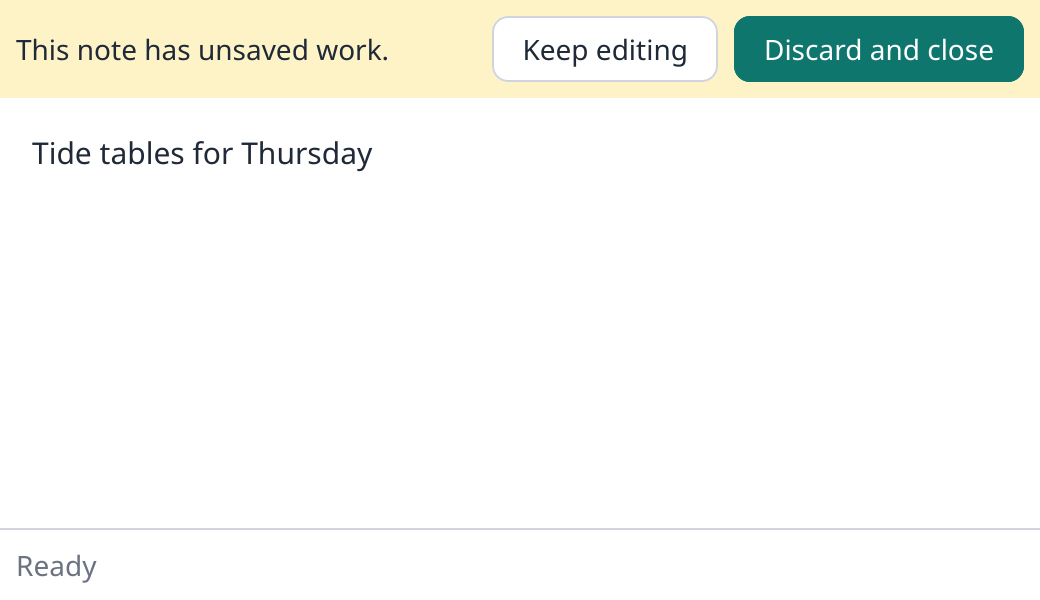
The close button was pressed while the note had unsaved work. Where the browser has WebGPU this is Pad again, with a title bar the page draws: type something, then press its close button.
Without
subs.closeRequested
, the close button closes the window. With it, the program decides:Silk
Copy
Message
.RequestedClose
=> {
if
!model.dirty {
return
run
Next
.with
(move
model, Command
.Quit
)
}
model.asking = true
}The window stays open until a command calls
Shell.quit()
. Pad quits at once when there is nothing to lose, and otherwise shows a bar that asks.Files are a service too
Pad reads and writes files, and
update
cannot. So the program declares what it needs:examples/src/native/pad.silk
Copy
/// Where notes are kept. The app provides the machine's files, and a test a file in memory.
pub
service
Disk
{
/// The text of the file at `path`; empty when it cannot be read.
effect
fn
read
(path: string) -> String
! OutOfMemoryError
? &mut
Disk
| &mut
Allocator
/// Whether `text` was written to `path`.
effect
fn
write
(path: string, text: string) -> bool
! OutOfMemoryError
? &mut
Disk
| &mut
Allocator
}The app provides the real thing.
The entry point
examples/apps/pad/src/main.silk
Copy
//! Pad in a native window. The window provides the `Shell` the program's commands ask for,
//! and this file provides the `Disk`: the machine's files.
import
examples.native.pad { Command
, Disk
, Message
, Pad
}
import
loom.lib { Shell
}
import
loom_window.program { Launched
, Window
, failed, launch, show, systemFonts }
import
silk.core.effect
{ Effect
}
import
silk.core.option { Option
}
import
silk.core.result { Result
}
import
silk.mem.allocator { Allocator
, OutOfMemoryError
}
import
silk.system.filesystem { FileError
, FileSystem
, Path
}
import
silk.system.filesystem_machine { MachineFileSystem
}
import
silk.text.string { InvalidUtf8
, String
}
/// The machine's files.
struct
Files
{
system: MachineFileSystem
,
}
impl
Files
{
effect
fn
load
(self: &mut
Self
, path: string) -> String
! FileError
| OutOfMemoryError
? &mut
Allocator
{
let
place = run
Path
.make
(path)
let
bytes = run
FileSystem
.readFile
(&place) |> Effect
.provideMut<FileSystem
>(&mut
self.system)
return
String
.fromBytes
(move
bytes) |> Result
<String
, InvalidUtf8
>.unwrapOr
(String
.make
())
}
effect
fn
store
(self: &mut
Self
, path: string, text: string) -> bool
! FileError
| OutOfMemoryError
? &mut
Allocator
{
let
place = run
Path
.make
(path)
run
FileSystem
.writeFile
(&place, String
.utf8Bytes
(text))
|> Effect
.provideMut<FileSystem
>(&mut
self.system)
return
true
}
}
effect
fn
unread
(error: FileError
) -> String
{
drop
error
return
String
.make
()
}
effect
fn
unwritten
(error: FileError
) -> bool {
drop
error
return
false
}
/// A command cannot fail, so a file that cannot be read or written is an answer, not an
/// error.
impl
Disk
for
Files
{
effect
fn
read
(self: &mut
Self
, path: string) -> String
! OutOfMemoryError
? &mut
Allocator
{
return
run
Effect
.catch<FileError
>(self.load
(path), unread)
}
effect
fn
write
(self: &mut
Self
, path: string, text: string) -> bool
! OutOfMemoryError
? &mut
Allocator
{
return
run
Effect
.catch<FileError
>(self.store
(path, text), unwritten)
}
}
effect
fn
pad
(platform: Option
<Launched
>) -> i32
! OutOfMemoryError
? &mut
Allocator
{
let
mut
window = run
Window
.make
("Pad"
, 640.0
, 440.0
)
// The shell of this window: its title, menu, dialogs and clipboard.
let
mut
shell = window.shell
()
let
mut
files = Files
{ system: run
MachineFileSystem
.make
() }
let
fonts = run
systemFonts
()
return
run
show<Pad
, Message
, Command
, &mut
Shell
| &mut
Disk
| &mut
Allocator
>(
move
window,
&fonts,
move
platform,
)
|> Effect
.provideMut<Shell
>(&mut
shell)
|> Effect
.provideMut<Disk
>(&mut
files)
}
fn
app
(platform: Option
<Launched
>) -> i32 {
let
mut
allocator = Allocator
.systemAllocatorProvider
()
return
run
Effect
.catchAll
(pad
(move
platform), failed)
|> Effect
.provideMut<Allocator
>(&mut
allocator)
}
pub
fn
main
() -> i32 {
return
launch
(
|platform: Option
<Launched
>| -> i32 {
return
app
(move
platform)
},
)
}Compare it with the first window. Two things were added:
•
window.shell()
is the shell of this window. Effect.provideMut<Shell>(&mut shell)
hands it to the program.•
Files
implements Disk
with the machine's file system, and is handed over the same way.The last type argument of
show
lists what the program's commands need: &mut Shell | &mut Disk | &mut Allocator
.Because the program only ever sees the two services, it can be run with other ones. Testing without a window does exactly that with this app.